🪐 Universal Logging with WPILOG
WPILOG is the standard open logging format used across the WPILib ecosystem. With AdvantageScope, WPILOG can serve as a universal container for multiple log files and formats. This means that a single .wpilog file can contain multiple streams of data encoded in any format supported by AdvantageScope, including CSV, vendor-specific logs, or additional WPILOG files.
This feature is designed to streamline diagnostics by collecting all of a robot's diagnostic data in a single universal log file; there is no need to download, associate, or synchronize multiple log files from a single match, even when collecting data from third-party libraries or external services. For example, a single WPILOG file can contain:
- Standard robot telemetry published via WPILib's
TelemetryAPI or NetworkTables. - High-frequency device signals logged by vendor libraries.
- Status data from coprocessors and external services logged to CSV or WPILOG.
- ...and more!
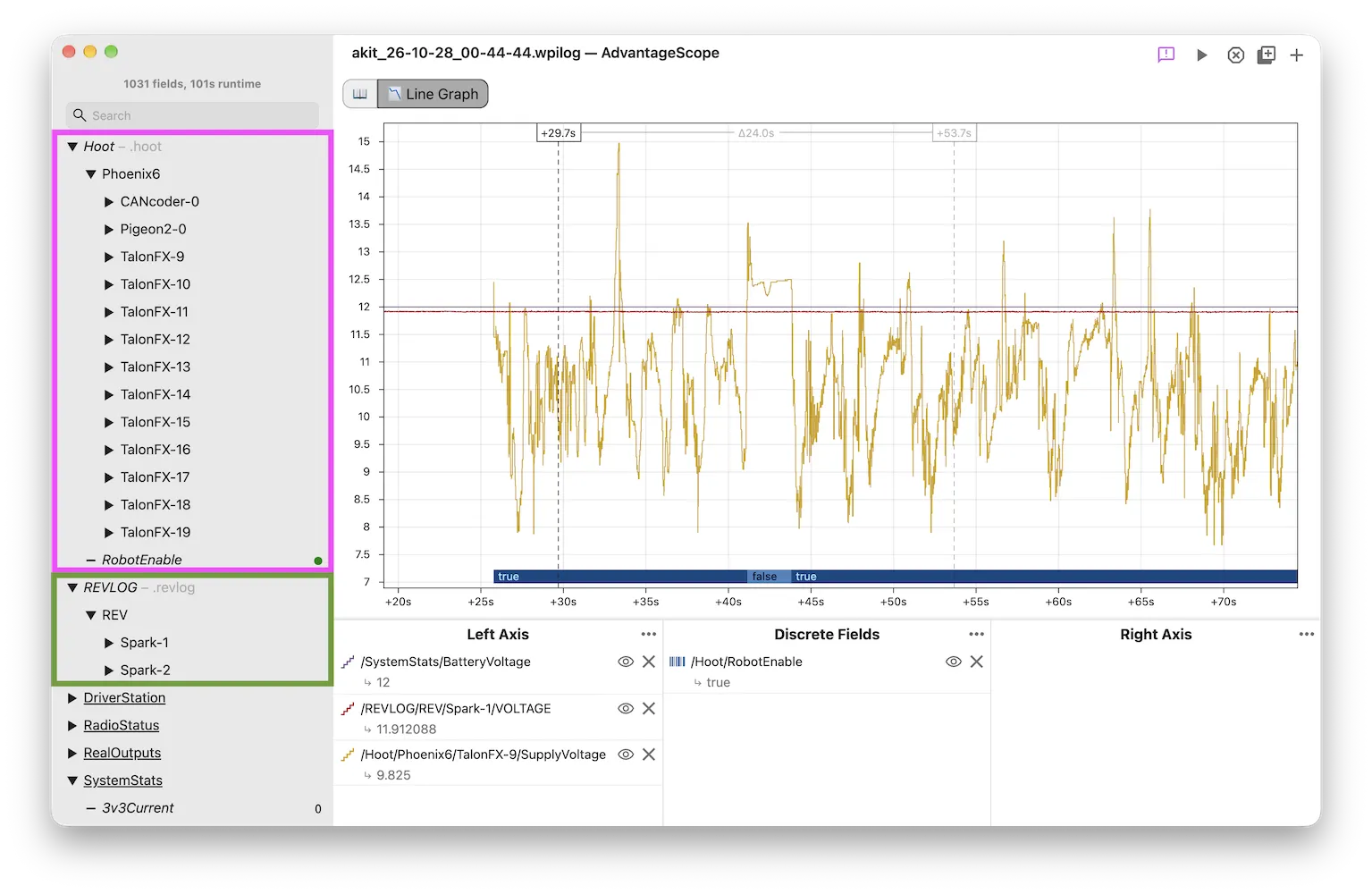
All of this data appears in a single unified tree in AdvantageScope, as shown below with a WPILOG containing device signals captured by multiple vendors.
On Systemcore, URCL has been replaced by the official REV status logger. Universal logging with AdvantageScope allows the official status logger to record data from all REV devices into a single WPILOG file (similar to URCL).
AdvantageKit users can also take advantage of XZ compression to significantly reduce the size of third-party logs stored within a WPILOG. Check the AdvantageKit documentation on log data receivers for details.
Experimental: Vendor Logging
Many robot projects generate multiple log files simultaneously: a standard WPILOG file for WPILib/AdvantageKit telemetry alongside proprietary files from vendor libraries. Universal logging eliminates this split by embedding those vendor logs directly into the main .wpilog. See the instructions below for WPILib and AdvantageKit.
As this approach is not officially supported by vendors, support requests should be directed to the AdvantageScope issues page or software@team6328.org. See Exporting Vendor Data for details on exporting the original log files for diagnostics.
- WPILib
- AdvantageKit
Vendor log capture via DataLogManager is not yet available as it depends on upstream changes to WPILib. We will share more information soon!
This feature requires AdvantageKit v27.0.0-beta-1, which will be available soon. You can check the current status on the GitHub releases page.
Vendor log capture is built into AdvantageKit and can be enabled as shown below. You must select an appropriate directory (we recommend /home/systemcore/logs/) for temporarily staging vendor logs during capture. See the How It Works section for details.
public Robot() {
  // Enable vendor log capturing from a temporary staging directory
  // We recommend staging vendor logs on the internal storage even
  // when using a USB drive (vendor logs do not persist after capture)
  Logger.setVendorLogDirectory("/home/systemcore/logs/");

  // Start AdvantageKit normally
  Logger.start();

  // Start the vendor logger AFTER the AdvantageKit logger
  // If configurable, the output directory must match the path above
  VendorLogger.setPath("/home/systemcore/logs/");
  VendorLogger.start();
}
Regardless of the selected log data receivers, vendor logs can only be viewed by downloading a WPILOG file. Live streaming is not supported due to the structure of the captured log data.
Note that some vendor loggers begin writing data immediately when the corresponding device class (e.g. SparkMax) is instantiated. We recommend waiting to instantiate hardware objects until the end of the Robot constructor to ensure that logs are captured.
How It Works
- Capture: The robot program runs standard WPILib logging alongside vendor loggers. A lightweight helper periodically reads new data written by the vendor loggers and packages the raw chunks directly into the active
DataLogstream. - Storage: The entire combined log is saved to a single
.wpilogfile (e.g. on a USB flash drive connected to Systemcore). Temporary vendor log files created on the robot do not persist across reboots, avoiding storage buildup. - Visualization: When AdvantageScope opens the
.wpilog, it automatically discovers any embedded log entries, decodes their contents, and merges all fields into the sidebar tree alongside standard telemetry. - Extraction: If you need to open a vendor log for support or advanced diagnostics, the original vendor log files can be losslessly extracted from the
.wpilogas described in Exporting Vendor Data
External log data is saved to the WPILOG format using a raw entry whose type string follows the log:<format> convention. When parsing one of these fields, AdvantageScope concatenates all binary records for that entry in chronological order and decodes the resulting payload as a standalone log in the specified format. The decoded signals are then merged into the main field tree and automatically synchronized with the existing data.
Universal logging with WPILOG is not limited to vendor logs; any logging format compatible with AdvantageScope can be embedded within a WPILOG using the same convention.
Exporting Vendor Data
While data from vendor logs can be browsed directly in AdvantageScope, it may sometimes be necessary to extract the original vendor log as it was produced by the original library (e.g. for inspection in vendor-specific utilities).
To export an individual child log directly from AdvantageScope, right-click on the child log entry in the sidebar and select Export Original Log....
For batch extraction, you can also use the extract_vendor_logs.py Python script, which searches one or more .wpilog or .wpilogxz files for all integrated vendor logs and exports them to separate files:
pip3 install robotpy-wpiutil # Required dependency
python3 extract_vendor_logs.py path/to/source.wpilog